

Description
Download Pal Engine - Desktop Companion – desktop companion, VRM character, AI companion, 3D character, animated friend, customizable desktop, digital workspace, AI personality
Overview
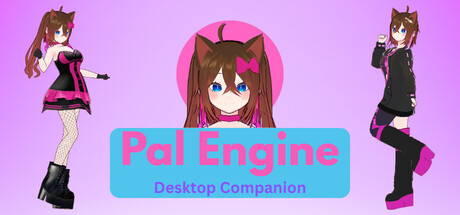
Pal Engine offers a unique digital experience that redefines the way users interact with their desktop environment. Designed as a simulation and utility application, it allows users to bring a personalized 3D companion directly onto their Windows workspace. By supporting VRM characters, the app enables users to import anime-style or realistic avatars, creating a dynamic and expressive digital presence. The core concept revolves around customization and interaction, offering a playful and relaxing way to personalize the digital workspace.
The application is not a traditional game but rather a desktop companion tool that blends animation, AI-powered personality interaction, and user-driven customization. It caters to individuals seeking creative expression, emotional comfort, or simply a more engaging desktop experience. The developer, Pal Engine, has positioned the app as a utility with entertainment value, aiming to bridge the gap between functional software and personal digital companionship. While specific narrative elements were not disclosed, the focus remains on the user’s ability to shape the companion’s presence and behavior through interaction.
Gameplay & Core Mechanics
Pal Engine operates as a desktop utility with interactive simulation elements. Users can load any VRM-formatted character into the environment, placing and resizing them across multiple monitors. The companion responds to user actions with animated movements, enhancing the sense of presence and engagement. Interaction is facilitated through chat-based input, allowing users to communicate with the AI-powered personality in real time.
The core mechanics emphasize customization, spatial placement, and responsive animation. The application enables users to adjust the companion’s position, size, and orientation, making it adaptable to various screen layouts. While specific gameplay modes or objectives were not detailed, the experience is designed around continuous interaction and personalization. The AI-driven personality adds variability to responses, creating a sense of individuality for each companion.
- Support for VRM character import (anime and realistic styles)
- Interactive chat with AI-powered personality
- Resizable and movable 3D companion across multiple monitors
- Real-time animations based on user interaction
- Customizable placement and orientation on desktop
Graphics, Audio & Performance
Pal Engine features a 3D visual style that leverages VRM character models for high-quality rendering. The animations are fluid and responsive, designed to reflect natural movement and interaction cues. The visual fidelity depends on the imported character’s complexity and the system’s rendering capabilities. The application maintains a clean, minimal interface to avoid cluttering the desktop environment.
Audio design is subtle, with ambient sounds and voice responses from the AI companion contributing to the immersive atmosphere. Sound effects accompany animations and interactions, enhancing the sense of presence. The soundtrack is not a core feature, but background audio elements are used to support the companion’s personality and mood. No official performance benchmarks were provided, and detailed graphical settings were not disclosed.
Platform Compatibility & Requirements
Pal Engine is available exclusively for Windows platforms. The application is designed to run on modern Windows operating systems, though specific OS versions were not listed. The release version was launched on April 5, 2025. The price for the full version is $12.99, available for direct download.
The developer did not list minimum system requirements. Compatibility details were not fully provided. Users are advised to ensure their system supports VRM model rendering and 3D animation for optimal performance. No additional hardware or software dependencies were mentioned.
Pros and Cons
Pros
- Unique concept combining desktop utility with AI-powered companionship
- Support for diverse VRM characters, including anime and realistic styles
- Interactive chat with AI personality enhances engagement
- Flexible placement and resizing across multiple monitors
- Relaxing and creative way to personalize digital workspace
Cons
- No official performance benchmarks or system requirement details
- Limited customization beyond placement and character import
- AI personality responses may vary in depth or consistency
- Dependent on third-party VRM models for character variety
- Exclusive to Windows, no cross-platform availability
FAQ Section
Is the game safe to download?
Yes, Pal Engine is a legitimate desktop application developed by Pal Engine. It is distributed through official channels and does not contain malware or intrusive tracking software.
Is it beginner-friendly?
Yes, the app is designed with simplicity in mind. Users can start interacting with their companion immediately after installation, with no complex setup or learning curve.
Does it receive updates?
While specific update frequency was not disclosed, the developer has indicated ongoing support for new features and improvements.
What platforms support it?
Pal Engine is currently available only for Windows operating systems.
Does the game require an internet connection?
Basic functionality does not require an internet connection. However, AI personality responses may rely on cloud-based services, so an internet connection is recommended for full interaction.
Final Thoughts
Pal Engine stands out as a refreshing and imaginative take on desktop personalization. By blending 3D animation, AI interaction, and user-driven customization, it creates a unique digital companion experience that’s both relaxing and creatively fulfilling. While it doesn’t follow traditional game structures, it excels in its niche as a utility with entertainment value. The ability to import VRM characters and interact with AI personalities adds depth to the experience, making it ideal for users who value personal expression and digital comfort. With a clear focus on simplicity and engagement, Pal Engine offers a compelling reason to rethink how we interact with our screens. Download Pal Engine now.
Guides & Tutorials for Pal Engine - Desktop Companion
How to install Pal Engine - Desktop Companion
- Click the Preview / Download button above.
- Once redirected, accept the terms and click Install.
- Wait for the Pal Engine - Desktop Companion download to finish on your device.
How to use Pal Engine - Desktop Companion
This software is primarily used for its core features described above. Open the app after installation to explore its capabilities.
User Reviews for Pal Engine - Desktop Companion 0
No reviews found




